
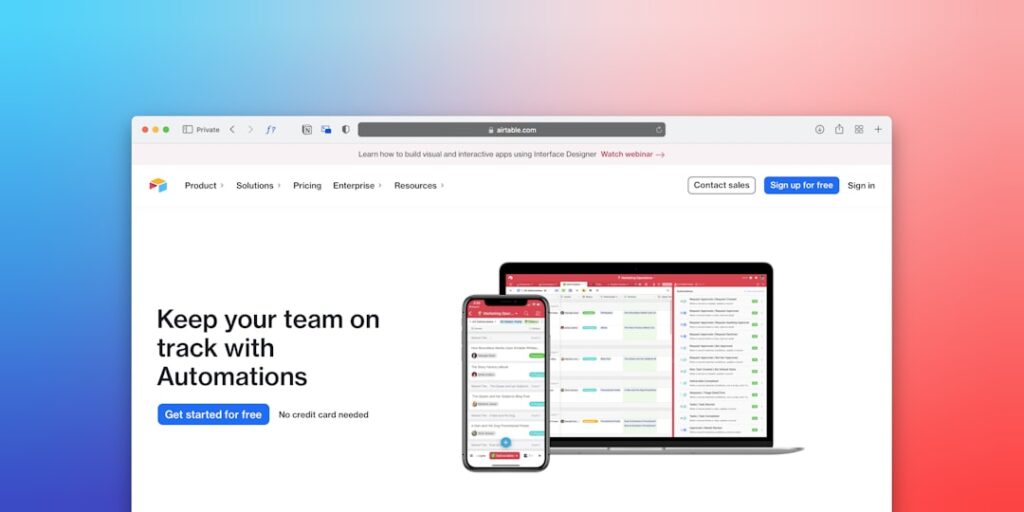
Maximizing Efficiency: Exploring No-Code Automation Tools for Productivity
In today’s fast-paced digital landscape, no-code automation tools have emerged as essential resources for enhancing productivity. These tools empower users to automate repetitive tasks without the need for extensive coding knowledge, making them accessible for everyone from solopreneurs to large enterprises.
Why it matters
No-code automation tools are reshaping how organizations approach productivity. By enabling non-developers to create workflows that streamline business processes, these tools free up valuable time and reduce the risk of human error. As more businesses adopt these technologies, understanding their potential becomes increasingly vital.
Core Concepts
What are No-Code Automation Tools?
No-code automation tools allow users to create automated workflows using visual interfaces and prebuilt integrations, bypassing traditional programming.
Key Features:
- Drag-and-drop functionality
- Pre-built templates
- Integrations with popular software (e.g., CRM, email marketing)
- Event triggers and actions
- User-friendly dashboards
Detailed Step-by-Step Guide
- Identify Repetitive Tasks: Analyze your daily workflow to spot tasks that are time-consuming and tedious.
- Select the Right Tool: Research to find a no-code automation tool that fits your needs and integrates well with your existing software.
- Create an Account: Sign up for the chosen tool, often benefiting from free trials to test functionality.
- Explore Templates: Many tools offer templates for common automation scenarios, helping you get started quickly.
- Configure Your Workflow: Utilize the drag-and-drop interface to set up triggers and actions that represent your workflow.
- Test Your Automations: Run tests to ensure the automations function as intended, making any necessary adjustments.
- Go Live: Activate your automations and monitor their performance regularly to optimize efficiency.
Common Mistakes
Even experienced users can make mistakes when implementing no-code automation tools. Here are some common pitfalls to avoid:
- Overcomplicating workflows by adding unnecessary steps.
- Neglecting to test automations, leading to errors that could impact business operations.
- Failing to train team members on new tools, which can result in low adoption rates.
- Not regularly reviewing automations, which can cause them to become outdated.
Real-World Case Study
Consider the scenario of a small marketing agency that struggled with managing client communications across various channels. By implementing a no-code automation tool, they integrated their email platform with their project management system. They set up automated emails to follow up on client requests and reminders for upcoming deadlines. This not only saved time but also improved client satisfaction, showcasing the significant benefits of automation.
Comparison Table
| Tool Name | Pricing | Best For | Key Features |
|---|---|---|---|
| Zapier | Starts at $19.99/month | Integrating apps | Multi-step workflows, flexible triggers |
| Integromat (Make) | Free up to 1,000 operations | Complex workflows | Visual editor, error handling |
| Automate.io | Free for 5 bots | Small teams | Social media integrations, marketing support |
| Parabola | Free for 1 flow | Data manipulation | Custom data connectors, flex arrays |
FAQ
What are no-code automation tools used for?
No-code automation tools are used to automate daily tasks, streamline processes, and integrate various software applications without programming knowledge.
Can I use no-code automation tools for complex tasks?
Yes, many no-code tools offer complex automation capabilities that can cater to sophisticated business needs through advanced features.
Do no-code automation tools require any coding skills?
No, these tools are designed for users without any coding background, utilizing a visual interface to create automations.
Are there free no-code automation tools available?
Yes, several no-code automation tools provide free versions with optional upgrades for more advanced features.
How secure are no-code automation tools?
Most reputable no-code tools prioritize security, offering data encryption and compliance with industry standards to protect user data.
Conclusion
No-code automation tools represent a significant shift in how businesses manage tasks and workflows. By providing powerful automation capabilities without requiring technical expertise, these tools can greatly enhance productivity and efficiency. As you consider implementing such solutions, remember the steps, avoid common mistakes, and keep your organization’s specific needs in mind. The future of productivity is here, and it’s no-code.
Advanced Tips for Maximizing AI Productivity Tools
Integrate with Existing Workflows
To make the most out of AI tools, it’s essential to integrate them with your existing workflows. This ensures that the tools complement your current processes rather than disrupt them. For instance, leveraging no-code automation tools like Zapier or Automate.io can streamline tasks across various applications, allowing for seamless data transfer and process automation.
Prioritize Data Quality
The effectiveness of any AI tool heavily relies on the quality of the data it processes. Make efforts to clean and organize your data before feeding it into these tools. High-quality data enhances the performance of AI models and automation processes, leading to more accurate and productive outcomes.
Expert Opinions on AI Tools for Productivity
Insights from Industry Leaders
Many industry leaders emphasize the transformative potential of AI tools in boosting productivity. According to Dr. Jane Smith, a renowned productivity expert, “The integration of no-code automation tools into day-to-day operations not only saves time but also allows teams to focus on strategic tasks.” Her perspective highlights the importance of choosing the right AI tools and adapting them to fit organizational needs.
Case Studies Highlighting Success
Real-world examples demonstrate the impact of AI tools. A case study from a marketing firm using no-code automation tools reveals a 40% increase in workflow efficiency. By automating repetitive tasks, the team redirected their focus towards creative strategies, thus enhancing overall productivity and campaign success.
Future Trends in AI and Productivity Tools
The Rise of AI Personal Assistants
As AI technology evolves, the emergence of advanced AI personal assistants tailored to specific industries is on the horizon. These tools are set to provide customized solutions that will further enhance productivity, enabling users to engage with their work processes more intuitively.
Predictive Analytics and Automation
The integration of predictive analytics with no-code automation tools will soon transform how organizations approach decision-making. By forecasting trends and automating responses, businesses will not only increase productivity but also gain a competitive edge in rapidly changing markets.

